Recursion Codes process Description example
( ** To simplify initially the comparison of this code with a Python program alternative, all Files are examined and printed out into the worksheet “explorer” output example, but there is a simple few lines ( ' ##### commented out ) which can be used to select Excel Files only. )
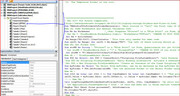
Here are the two full codes with full 'Comments and the descriptions below follow that code.
_1) Calling Sub( _ ) routine.
http://www.excelfox.com/forum/showth...0419#post10419
_2) Second routine ( routine used in recursion process, and called initially, ( once ) , from _1) ). This will usually “Call” itself many times, after it is set off by _1 )
Sub VBALoopThroughEachFolderAndItsFile(Folder, , , __ :
http://www.excelfox.com/forum/showth...0419#post10419
( ( This is a shorter simplified both codes version : ) To be added )
( Codes are also in the first Worksheet Code module of this Workbook: ( ‘== ' Dec 2017 For Python Comparison. https://app.box.com/s/gfuintgifu1hgw5nap3jriz2x8mp911x ) )
Full codes description.
This description is of the two codes. The codes should be copied to the same code module. The codes are split into a few sections for compatibility with some earlier alternative code versions, ( some of which do not use the recursion technique ) ( https://www.excelforum.com/developme...ml#post4440515 https://www.excelforum.com/developme...ml#post4440512 ),
Calling Sub VBADoStuffInFoldersInFolderRecursion ( _ )
Rem 1A) Worksheet info.
Rem 2A) Initial ( Start ) Folder
Rem 3A) System Library Object
Rem 4A) 'Some variables for Position of Things
Sub VBALoopThroughEachFolderAndItsFile(Folder, , , __
Rem 5A) Doing while Sub ( Under ) Folders are still found
__'5Ab) Doing stuff for current Folder
__'5Ac) Doing stuff for current file
( Rem 6) Handling Errors )
Rem 1A) Worksheet info.
Often such codes make no particular reference to a worksheet, and the output to a worksheet is either not required or is simply by default to the active worksheet starting from Top left of first cell A1. In this code version the worksheet can be hard coded here, as can the Top Left cell from where the output should start.
Rem 2A) Initial ( Start ) Folder
For this example the example main Folder to be searched for is named " EileensFldr". It can be seen and downloaded from here : https://app.box.com/s/k3m0xfm89msqpoarpx93onyyqupydzk8
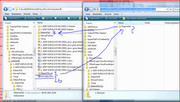
EileensFldr zip Download.jpg https://imgur.com/f7V2PTL
By me in Windows that downloads as a .zip File. To use the File, I store it anywhere, then I make a Folder with the name EileensFldr in the same Folder which contains the File in which I place the macros being described here.
EileensFldr Make Empty Folder.JPG https://imgur.com/6kolxi4
Then I copy all the files in Folder EileensFldr.zip
EileensFldr Contents Copy.JPG https://imgur.com/hgqg64w
And paste into the new Folder which is in the same Folder which contains the File in which I place the macros being described here.
EileensFldr Contents Paste.JPG https://imgur.com/4qK00eI
You may have a different method for “unzipping” a “Zipped file”, but the important thing is that you end up with both the File containing the macros and the example File in the same Main Folder.
Example Folder and Macro File in same Folder.JPG https://imgur.com/LWSUssc
The above requirement is only because of this code line _..
Let strWB = ThisWorkbook.Path & "" & "EileensFldr"
_.. That code line tells the code that the Initial Folder is in the same Folder as the file in which the code is.
Often such codes are written such that they ask you to select a Folder to be searched through. Here it is simply hardcoded to simplify the demo code.
Rem 3A) System Library Object, FileSystemObject Object
An external Library is made available which allows access to a computer File system.
Rem 4A) 'Some variables for Position of Things
The variables that are used to keep track of “where” we are in the Tree root structure are initialised.
We use a couple of variables:
_ We pass a variable, rCnt, to the second routine copies which are run, to be used By Referring to it ( giving it ) a count of the number of times a copy of the second routine instructions is run through. This will be used to increment the row number that each Folder name or Excel File name is written in. It is increased by 1 just before a File Name entry is made. Just before a Folder name entry is made, it is increased by 2. The extra 1 is just done for neatness, to give an extra empty Line before each Folder. The name for any contained Files will come directly under the Folder name.
and
_ We also pass a Value to the second routine copies which are run, which effectively gives an indication of the Copy Number of the second routine copy being used. The logic for this needs some very careful explanation. In the initial main routine Sub( ) this is passed a variable, CopyNumber1 , which we set in this code section to = 1 . That logic is fairly easy to understand: The copy set off by the Sub( ) is the first copy
Which variable value is passed when the second routine calls itself, and how that value is further used is very subtle, and once again, I think it is important to bear in mind that we typically will have independent copies of the second routine either running …. see –- Rem 5A)
( Finally in code section 4A) the main Folder Path and Name is written to the Worksheet, and then the second routine is set off for the fist time, that is to say, the first copy of that second routine is made and set off. )
Sub VBALoopThroughEachFolderAndItsFile(Folder, , , __
-- Rem 5A) Doing while Sub ( Under ) Folders are still found
At the outset of the second routine, the variable keeping track of the second routine copy number is dealt with. That logic needs careful explanation. The problem is how do I know which “Copy” Routine I am in. Every successive Copy will relate to a run in a .. “the next “down” or “to the right” Folder “level”. I cannot simply add a progressively increasing count, ( as I can and do for the row for next output, rCnt ) , as in the recursion Code I will be going “back and forth” depending on if and where Sub folders are. I need a way to know at which “level” of Sub Folders I am in when in at any time. That variable is used to determine the column in which to write a Folder or File name. ( Each column in the final output represents a different Folder level )
I achieve the necessary as follows. It demonstrates well how recursion works. Here we go:
Inside the Routine towards the start is a variable,
CopyNumber.
This will be a unique variable for each “Copy” Routine. Ideally I would like to rename this at each level down/ to the right something like CopyNumber1, CopyNumber2, CopyNumber3 … etc. But, I cannot do that as VBA only allows me to type in the code window a single Master copy of the code. Effectively as the recursion process is going on, and we have a copy or the second routine, say the forth copy running, then VBA has stored, amongst other things, the following variables (in the “stack”, as it is called )….
Routine copy 4 : CopyNumber
Routine copy 3 : CopyNumber
Routine copy 2 : CopyNumber
Routine copy 1 : CopyNumber
That is to say we have a unique CopyNumber variable which is paused or in use. (Confusingly to us, they all have the same name. But VBA holds them in a different “stack place”, so somehow can keep track and use the appropriate one ). Only one ( or none ) will be in use at any time. The one in use at any time needs to hold an integer number to indicate the copy number or “how far down” or “to the right” we are.
Here is a working logic which is used:
Every time the Routine is called a number is taken in at the value inside a variable in the signature line
CopyNumberFroNxtLvl
For the very first call , ( by the main first routine ), as mentioned, it is set to 1 in a variable whose value is taken in at its value, as a value, in the Signature line.
Towards the start of the second routine, the local variable, is given this passed value of 1
Subsequently, however, when the second routine “calls” itself, the value passed to CopyNumberFroNxtLvl will be given the
= ( value of the local variable, CopyNumber , from the routine copy doing the call ) +1
Hence as further copies are started, the integer held within the local variable, CopyNumber, will be one higher then the previous copy. This value is then either in use, or in the appropriate place in the stack, to be used when any paused copy resumes.
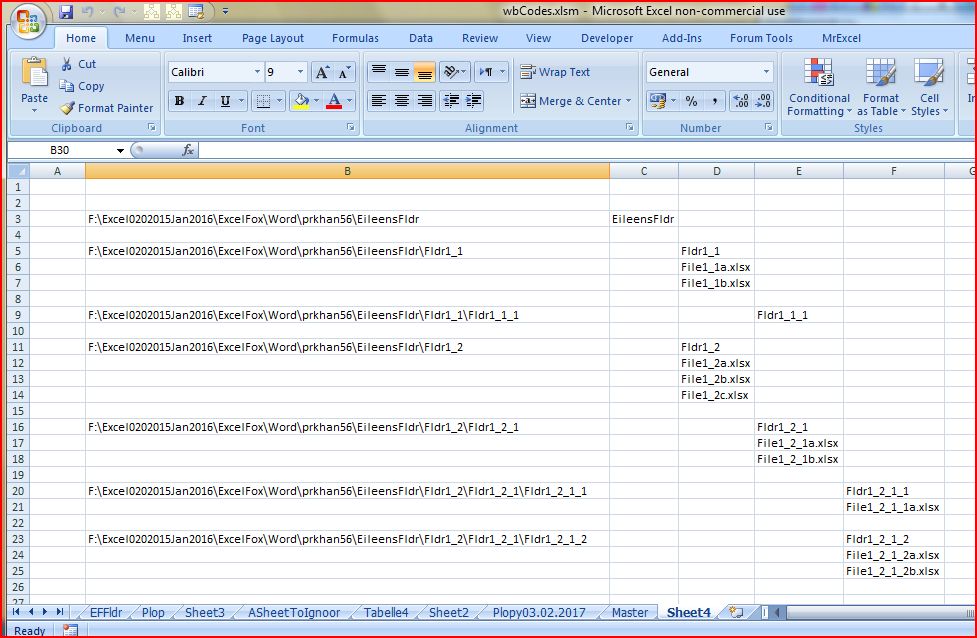
This somewhat complicated process is necessary so that paused routine copies have available to use the correct integer when they resume. This is possibly demonstrated better pictorially by looking at the output produced in the worksheet, along with the extra comments in orange https://imgur.com/FjjUMYz
The rest of section Rem5 follows a fairly standard format for this type of recursion code.
'5Ab) The initial condition here is also the means by which “stack overflow” is avoided: The main and major part of the second ( recursion ) routine is done only For Each Sub Folder found within the current Folder taken into the routine at the signature line. ( Note here, that should there be any Files in the main initial Folder, then this routine will not catch and list them, as the routine goes straight into looking in any Sub Forums found ).
Assuming one or more Sub Folders are found, then the code is at the classic section for … „Doing stuff for each Folder”,….. In this case the row for an output, rCnt, is increases by 2, ( 1 for a new line, and 1 to make an empty line to help make the final output a bit clearer ) , and then Folder name is pasted to a cell, whose co ordinates are given by rCnt for row, and CopyNumber for column. ( For Folders an initial column is also used for the complete full Path and Name )
'5Ac) Doing stuff for current file. A second For Each Loop, this time for any Files in the current Folder, is nested in the previous '5Ab) For Each loop. For every File, the row for an output, rCnt, is increases by 1 and the File Name is written to the worksheet. - The cell co ordinate given by rCnt and the same value of CopyNumber used for the cell co ordinate used for the File Name of the file in which the file or files are. That way the File names are neatly written directly under their Folder name.
Once all File names are outputted, the point is reached where the routine “calls itself”. So at that point a new copy of the second routine is made, and the Folder given is the current one , ( the one which had just had its Name and the Name of any Files within it outputted.) The variable passed to indicate the level of the folder is then given the value of
= ( the current CopyNumber )+ 1
Hence any further outputs made by the new copy just started will be written outputted 1 column to the right of the previous.
_..._____________________________
The next post shows the output that should be achieved with the given codes and sample Folder
Ref
http://www.excelfox.com/forum/showth...0144#post10144
https://www.excelforum.com/excel-pro...ml#post4348630
http://excelpoweruser.blogspot.de/20...-files-in.html
http://www.excelforum.com/excel-prog...ubfolders.html
http://www.excelforum.com/tips-and-t...ml#post4221356
http://www.excelforum.com/excel-prog...ubfolders.html
http://excelmatters.com/2013/09/23/v...-late-binding/
http://www.mrexcel.com/forum/general...plication.html
http://www.eileenslounge.com/viewtopic.php?f=27&t=22499
http://www.excelfox.com/forum/showth...0419#post10419


Reply With Quote
Bookmarks